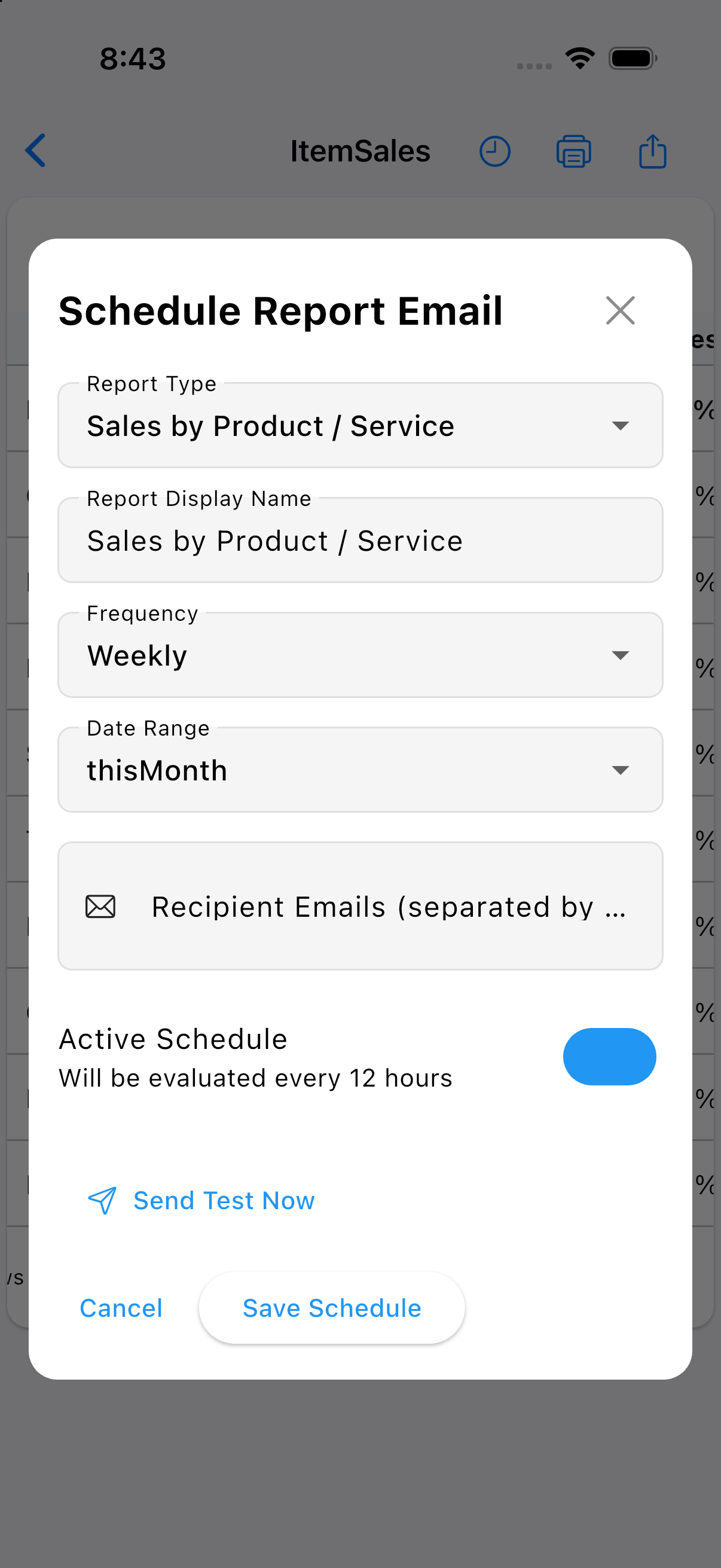
SierraBooks provides automated, background email delivery for your financial and operational reports. Scheduled reports allow business owners, bookkeepers, and corporate stakeholders to receive consistent, formatted updates directly in their inbox without manual export or intervention.
To configure an automated report, navigate into any report (e.g. Sales by Product / Service, Item Sales, Profit & Loss), and tap the Schedule (clock) icon in the top navigation bar.
Configuration Options.
Report Type: Automatically linked to the active report view (e.g., Sales by Product / Service).
Report Display Name: Customize the report title that appears in email subject headers and attached summaries.
Frequency: Choose the recurrence cadence for report compilation and dispatch (e.g., Weekly, Monthly, Quarterly).
Date Range: Select dynamic, rolling date windows (such as thisMonth, lastMonth, or thisQuarter) so each scheduled delivery reflects up-to-date data.
Recipient Emails: Specify one or more destination email addresses (separated by commas) to receive the compiled reports.
Active Schedule: Toggle schedule automation on or off. Active schedules are evaluated every 12 hours by the background synchronization service.
Send Test Now: Trigger an immediate on-demand test email to verify formatting, layout, and recipient deliverability prior to saving.